A tool is only useful if it's designed for its user. Hand a smartphone to our distant ancestors and they'd see a useless glass rectangle. The same applies to agents[agent]: they increasingly act on our behalf, but they need tools designed for how they work.
The missing piece is connectivity: to corporate data, physical devices, external services, anything beyond the agent's built-in capabilities. Existing APIs aren't AI-friendly, and installing heavy integrations adds complexity, limits accessibility, and is often prohibited on corporate laptops anyway.
What we actually want is a clean interface: authenticate once, no additional setup, and your agent gains the context it needs to succeed at whatever objective you give it. This guide focuses on corporate data (emails, calendars, project boards), but the pattern applies to anything you want your agent to reach. (If you're curious about what "agent success" means in practice, I've written about working with agents vs through them, worth a read with your coffee.)
The Model Context Protocol (MCP)[mcp] solves the connectivity problem. It's a standard way for agents to call external tools. The software that connects to MCP servers is called an MCP client. VS Code with GitHub Copilot is an MCP client, and more are emerging. But connectivity without security is dangerous. You don't want your MCP client holding the keys to your entire Microsoft 365 tenant.
This guide shows you how to build an MCP server that:
- Authenticates users via Azure Entra ID
- Accesses Microsoft services as the user, not as a service account
- Runs on Azure Container Apps for about $5/month
- Uses zero hardcoded secrets in production
We'll build two tools: one that fetches your Microsoft Graph profile, another that fetches your Azure DevOps[devops] profile. Simple, but they demonstrate a pattern you can extend to any Microsoft service.
Why This Guide Exists
This guide isn't just about deploying an MCP server. It's about exposing you to a stack of technologies that are becoming essential knowledge:
- Python and modern async programming
- FastMCP framework for building MCP servers
- Docker and multi-stage container builds
- Azure Container Apps and serverless container hosting
- Managed Identities and secretless authentication
- App Registrations in Azure Entra ID
- OAuth2 scopes, consent, and the On-Behalf-Of flow
- Delegated permissions vs application permissions[delegated]
Powerful general agents are lowering barriers that once separated professions. I suspect the lines between job roles will blur significantly in the coming years, and everyone needs to look honestly at their skills matrix. By the end of this guide, you'll have hands-on experience with all of these concepts, not just a deployed server. Hopefully it gives you high-level coordinates and sparks your interest to dig deeper into architecture, software development, cloud platforms, or security.
The Problem with Token Forwarding
Here's the naive approach: user logs in, gets a token, MCP server forwards that token to Microsoft Graph[graph]. It works, technically. It's also a security nightmare.
When you forward tokens:
- The MCP server sees a token valid for all the scopes[scopes] the user consented to
- If the server is compromised, attackers get broad access
- You can't restrict what the server can do on behalf of the user (without baking that logic into the server itself)
- Audit logs show all actions coming from one client, making incident response harder
The token your MCP client receives might have permission to read emails, send emails, access files, and manage calendar. Your MCP server only needs to read a profile. Why give it more?
OAuth2 On-Behalf-Of: Scoped Delegation
The On-Behalf-Of (OBO) flow[obo] solves this. Instead of forwarding the user's token, the MCP server exchanges it for a new, narrowly-scoped token.
Here's the flow:
┌─────────────┐   ┌─────────────┐   ┌─────────────┐   ┌─────────────┐
│ MCP Client  │   │ Azure Entra │   │ MCP Server  │   │  MS Graph   │
│  (VS Code)  │   │     ID      │   │             │   │             │
└──────┬──────┘   └──────┬──────┘   └──────┬──────┘   └──────┬──────┘
       │                 │                 │                 │
       │ 1. Auth request │                 │                 │
       │ (user logs in)  │                 │                 │
       │────────────────>│                 │                 │
       │                 │                 │                 │
       │ 2. Token A      │                 │                 │
       │ (for MCP Server)│                 │                 │
       │<────────────────│                 │                 │
       │                 │                 │                 │
       │ 3. MCP request + Token A          │                 │
       │──────────────────────────────────>│                 │
       │                 │                 │                 │
       │                 │ 4. OBO exchange │                 │
       │                 │ Token A → B     │                 │
       │                 │<────────────────│                 │
       │                 │                 │                 │
       │                 │ 5. Token B      │                 │
       │                 │ (for Graph)     │                 │
       │                 │────────────────>│                 │
       │                 │                 │                 │
       │                 │                 │ 6. API call     │
       │                 │                 │ with Token B    │
       │                 │                 │────────────────>│
       │                 │                 │                 │
       │                 │                 │ 7. User data    │
       │                 │                 │<────────────────│
       │                 │                 │                 │
       │ 8. MCP response (profile data)    │                 │
       │<──────────────────────────────────│                 │
       │                 │                 │                 │12345678910111213141516171819202122232425262728293031323334
Token A and Token B are different tokens with different scopes.
- Token A (from step 2): Issued to the MCP client, audience is the MCP server
- Token B (from step 5): Issued to the MCP server, audience is Microsoft Graph
Token A can't be used against Microsoft Graph directly: wrong audience. The MCP server must exchange it for Token B, and Token B only has the specific scopes the server requested (like User.Read).
If an attacker compromises the MCP server:
- They can't use Token A against Graph (wrong audience)
- They can only get Token B with the scopes the server is configured to request
- They can't escalate to broader permissions
This is the principle of least privilege, enforced by the identity provider.
Why the User's Identity Matters
OBO preserves the user's identity through the exchange. Token B isn't a generic service token. It's a token that says "the MCP server is acting on behalf of user X".
This means:
- Audit trails: Microsoft Graph logs show which user performed each action
- Conditional Access: Policies based on user risk, location, or device still apply
- Data boundaries: Users only see data they're authorised to see
Compare this to a service account approach where one credential accesses everything. With OBO, permissions are always scoped to the authenticated user.
Managed Identity: No Secrets in Production
There's still a question: how does the MCP server prove to Azure Entra ID[entra] that it's allowed to perform OBO exchanges?
The traditional answer is a client secret or certificate. You register your app, create a secret, and store it... somewhere. Environment variables, Key Vault, wherever. It works, but now you have a secret to manage, rotate, and protect.
Azure Managed Identity[mi] eliminates this entirely. When your MCP server runs on Azure Container Apps, Azure automatically injects credentials that prove the server's identity. No secrets in your code, no secrets in your config, no secrets to leak.
The OBO exchange becomes:
- MCP server receives Token A from user
- MCP server asks Azure Entra ID: "Exchange Token A for Token B with these scopes"
- Azure Entra ID verifies:
- Token A is valid and not expired
- Token A's audience matches the MCP server's app registration
- The MCP server's Managed Identity is authorised to perform OBO
- The requested scopes are allowed for this app
- Azure Entra ID issues Token B
No secrets involved. The Managed Identity handles authentication automatically.
When you need secrets:
- Local development: Managed Identity only works on Azure. For local dev, you'll use a client secret.
- Other clouds: The MCP server we're building can run on AWS, GCP, or anywhere else and still authenticate against Entra ID. You'll just need to store the client secret securely on that platform.
The point is flexibility: Managed Identity is the ideal for Azure deployments, but the same code works anywhere with a secret fallback.
Stateless by Design
Our MCP server is stateless at the HTTP layer. It doesn't manage OAuth flows, maintain session cookies, or require persistent storage. Every request is independent. (MSAL does cache OBO tokens in memory to avoid redundant exchanges, but this is transient and handled automatically.)
How? We offload the entire OAuth2 flow to Azure Entra ID. The MCP client (VS Code with GitHub Copilot) handles user authentication directly with Entra ID and sends us a ready-to-use token. We validate it, exchange it via OBO, call the downstream API, and return the result. No session cookies, no token storage, no cache invalidation headaches.
This works beautifully for read-only tools like the profile endpoints we're building. For tools that need to maintain state across requests (like a multi-step workflow or a long-running operation), you'd need a different approach with proper token caching. That's a topic for a future guide.
Why VS Code?
We're using VS Code with GitHub Copilot as our MCP client. There's a good reason beyond convenience.
Azure Entra ID doesn't support dynamic client registration[dcr]. This means you can't have arbitrary MCP clients register themselves on the fly. Normally, you'd need to pre-register every MCP client that wants to connect to your MCP server. (You can build DCR solutions on top of Entra ID or use credential managers from API Management, but that's beyond this guide's scope.)
VS Code is already registered as a first-party Microsoft application, managed as part of their platform and Entra ID offerings. When you use it as your MCP client, you inherit that infrastructure for free. VS Code also handles token rotation automatically: when your access token expires, it seamlessly refreshes without interrupting your workflow.
This means:
- No client registration on your end
- No client secrets to manage for the MCP client
- Automatic token refresh handled by VS Code
- Works immediately with any Entra ID tenant
We'll also pre-authorise Azure CLI. While it's not an MCP client itself, you can use it to request Bearer tokens manually for testing with other MCP clients or tools like curl. This is useful for debugging or integrating with clients that don't yet have built-in OAuth support.
You're offloading operational headaches to Microsoft. The only secrets you might manage are for your MCP server itself (and only if you're not using Managed Identity).
Token Validation: Trust but Verify
Before exchanging any token, the MCP server must validate it. A malicious client could send garbage, expired tokens, or tokens meant for a different service.
Our server validates:
- Signature: Token is signed by Azure Entra ID (verified via JWKS endpoint)
- Audience: Token is specifically for our MCP server, not some other app
- Issuer: Token comes from the expected Azure tenant
- Expiry: Token hasn't expired
- Age: Token isn't suspiciously old (we reject tokens older than 24 hours even if not expired)
- Not before: Token isn't dated in the future (with 5-minute clock skew allowance)
The first four checks are standard JWT validation. The 24-hour age check demonstrates how to add custom validation logic: Azure's exp claim handles expiry, but you might want tighter constraints for specific use cases. It's only included in this guide to show the pattern.
What We're Building: Architecture Overview
┌────────────────────────────────────────────────────────────┐
│                    Azure Container Apps                    │
│  ┌──────────────────────────────────────────────────────┐  │
│  │                  MCP Server (Python)                 │  │
│  │                                                      │  │
│  │  ┌────────────┐ ┌────────────┐ ┌──────────────────┐  │  │
│  │  │    JWT     │ │    OBO     │ │   FastMCP Auth   │  │  │
│  │  │  Validator │ │  Handler   │ │     Provider     │  │  │
│  │  └────────────┘ └────────────┘ └──────────────────┘  │  │
│  │                                                      │  │
│  │  ┌────────────────────────────────────────────────┐  │  │
│  │  │                  MCP Tools                     │  │  │
│  │  │  • graph_get_profile  • devops_get_profile     │  │  │
│  │  └────────────────────────────────────────────────┘  │  │
│  └──────────────────────────────────────────────────────┘  │
│                            │                               │
│                  User Assigned Managed Identity            │
└────────────────────────────────────────────────────────────┘
                             │
                             │ OBO Token Exchange
                             ▼
                  ┌─────────────────────┐
                  │   Azure Entra ID    │
                  └─────────────────────┘
                             │
            ┌────────────────┴────────────────┐
            │                                 │
            ▼                                 ▼
  ┌──────────────────┐             ┌──────────────────┐
  │  Microsoft Graph │             │   Azure DevOps   │
  │  (User Profile)  │             │  (User Profile)  │
  └──────────────────┘             └──────────────────┘1234567891011121314151617181920212223242526272829303132
The components:
- JWT Validator: Verifies incoming tokens before any processing
- OBO Handler: Exchanges user tokens for service-specific tokens using MSAL[msal]
- FastMCP Auth Provider[fastmcp]: Implements OAuth discovery (RFC 9728)[rfc9728] so MCP clients know where to authenticate
- MCP Tools: The actual tools that call Microsoft APIs
We'll build each component, then wire them together.
A Note on Tool Design
We're building two separate tools (graph_get_profile and devops_get_profile) to clearly show the OBO pattern with different services. In practice, you'd likely combine these into a single get_user_context tool that:
- Fetches from both services in parallel
- Deduplicates overlapping information (email appears in both)
- Returns a concise summary useful to the MCP client
- Preserves context window by not returning everything
MCP tools should return what the client needs, not raw API responses. Every token returned is context that has to be processed. A well-designed tool filters and summarises, returning only what's useful for the task at hand. But for learning the authentication pattern, separate tools make the flow clearer.
Prerequisites
Prepare your environment for the best experience with this guide.
Permissions required:
- Azure subscription with Owner or User Access Administrator + Contributor permissions
- Entra ID permissions to create app registrations, security groups, and grant admin consent
Environment recommendations:
- Use a personal device and tenant, or an environment designed for experimentation (sandbox tenants, dev subscriptions). Don't run this against production.
- This guide was tested on Linux. It should work on macOS. If you're on Windows, I recommend using WSL2[wsl2].
- If your machine runs SSL-intercepting software (Netskope, zScaler, corporate proxies), ensure your uv/Python environment is configured with the appropriate certificates.
Tools you'll need:
- Azure CLI: Installed and logged in (
az login) - Python 3.11+: We use modern type hints and async/await
- uv[uv]: A fast Python package manager. We use it throughout this guide because it's simple and handles virtual environments automatically.
- Docker: For building container images
- An MCP client: VS Code with GitHub Copilot extension
We'll use Azure CLI commands throughout this guide for accessibility. If you prefer infrastructure-as-code, feed this guide's URL to your AI agent[context-trust]: the site returns markdown for AI clients, making translation to Terraform, Bicep, or your IaC of choice straightforward.
Part 2: Azure Infrastructure
Here's what we'll create:
| Resource | Purpose |
|---|---|
| Resource Group | Container for all resources |
| Log Analytics Workspace | Centralised logging for Container Apps |
| Container App Environment | Platform that hosts Container Apps |
| Container Registry | Stores Docker images |
| User-Assigned Managed Identity | Authenticates without secrets |
| App Registration | OAuth2 configuration in Entra ID |
| Service Principal | Identity users authenticate against |
| Security Group | Controls who can access the MCP server |
| Federated Credential | Links Managed Identity to App Registration |
Set Up Variables
First, define the variables we'll use. Adjust these to match your environment:
# Your Azure configuration
TENANT_ID="your-tenant-id"           # From: az account show --query tenantId -o tsv
SUBSCRIPTION_ID="your-subscription"  # From: az account show --query id -o tsv
LOCATION="uksouth"                   # Azure region (uksouth, eastus, westeurope, etc.)

# Naming
PREFIX="mcp"                         # Short prefix for resource names
ENV="dev"                            # Environment: dev, stg, prd

# Generate a random identifier (4 hex characters)
# This identifies ALL resources from this deployment for easy cleanup later
RANDOM_ID=$(printf '%04x' $RANDOM)
echo "Random ID for this deployment: $RANDOM_ID"12345678910111213
Why the random identifier? App registrations and service principals in Entra ID can have identical display names. When you have multiple deployments or need to clean up, this random suffix lets you identify exactly which resources belong together. Keep this value safe.
# Derived names (following Azure naming conventions)
# All resources include the random ID for identification
RESOURCE_GROUP="rg-${PREFIX}-${ENV}-${RANDOM_ID}"
CONTAINER_ENV="cae-${PREFIX}-${ENV}-${RANDOM_ID}"
CONTAINER_REGISTRY="acr${PREFIX}${ENV}${RANDOM_ID}"  # ACR names must be globally unique and alphanumeric only
MANAGED_IDENTITY="id-${PREFIX}-${ENV}-${RANDOM_ID}"
LOG_ANALYTICS="log-${PREFIX}-${ENV}-${RANDOM_ID}"
CONTAINER_APP="ca-${PREFIX}-${ENV}-${RANDOM_ID}"
APP_DISPLAY_NAME="MCP OAuth2 OBO Server (${PREFIX}-${ENV}-${RANDOM_ID})"123456789
The random ID serves two purposes:
- Global uniqueness: Container Registry names must be unique across all of Azure. The random suffix prevents collisions.
- Resource identification: When you need to clean up or audit, you can search for resources containing your random ID.
Verify you're logged in and using the right subscription:
az login
az account set --subscription "$SUBSCRIPTION_ID"
az account show123
Create the Resource Group
Everything lives in a resource group:
az group create \
  --name "$RESOURCE_GROUP" \
  --location "$LOCATION"123
Create Log Analytics Workspace
Container App Environment requires a Log Analytics workspace for logging:
az monitor log-analytics workspace create \
  --resource-group "$RESOURCE_GROUP" \
  --workspace-name "$LOG_ANALYTICS" \
  --location "$LOCATION"

# Get the workspace ID and key for later
LOG_ANALYTICS_WORKSPACE_ID=$(az monitor log-analytics workspace show \
  --resource-group "$RESOURCE_GROUP" \
  --workspace-name "$LOG_ANALYTICS" \
  --query customerId -o tsv)

LOG_ANALYTICS_KEY=$(az monitor log-analytics workspace get-shared-keys \
  --resource-group "$RESOURCE_GROUP" \
  --workspace-name "$LOG_ANALYTICS" \
  --query primarySharedKey -o tsv)123456789101112131415
Create Container App Environment
The environment is the hosting platform for Container Apps:
az containerapp env create \
  --name "$CONTAINER_ENV" \
  --resource-group "$RESOURCE_GROUP" \
  --location "$LOCATION" \
  --logs-workspace-id "$LOG_ANALYTICS_WORKSPACE_ID" \
  --logs-workspace-key "$LOG_ANALYTICS_KEY"123456
Create Container Registry
We'll store our Docker images here:
az acr create \
  --name "$CONTAINER_REGISTRY" \
  --resource-group "$RESOURCE_GROUP" \
  --location "$LOCATION" \
  --sku Basic \
  --admin-enabled false123456
We disable admin access because we'll use Managed Identity for authentication instead of passwords.
Create User-Assigned Managed Identity
This identity will authenticate to Azure services without secrets:
az identity create \
  --name "$MANAGED_IDENTITY" \
  --resource-group "$RESOURCE_GROUP" \
  --location "$LOCATION"

# Get the identity details for later
MI_CLIENT_ID=$(az identity show \
  --name "$MANAGED_IDENTITY" \
  --resource-group "$RESOURCE_GROUP" \
  --query clientId -o tsv)

MI_PRINCIPAL_ID=$(az identity show \
  --name "$MANAGED_IDENTITY" \
  --resource-group "$RESOURCE_GROUP" \
  --query principalId -o tsv)

MI_RESOURCE_ID=$(az identity show \
  --name "$MANAGED_IDENTITY" \
  --resource-group "$RESOURCE_GROUP" \
  --query id -o tsv)1234567891011121314151617181920
Grant ACR Pull Permission
Allow the Managed Identity to pull images from the Container Registry. We add a short delay to ensure the Managed Identity has propagated to Azure AD before creating the role assignment:
ACR_ID=$(az acr show \
  --name "$CONTAINER_REGISTRY" \
  --resource-group "$RESOURCE_GROUP" \
  --query id -o tsv)

# Wait for Managed Identity to propagate to Azure AD
echo "Waiting for Managed Identity to propagate..."
sleep 15

az role assignment create \
  --assignee "$MI_PRINCIPAL_ID" \
  --role "AcrPull" \
  --scope "$ACR_ID"12345678910111213
Register Application in Entra ID
This is where the OAuth2 magic happens. We'll create an app registration that:
- Defines what permissions the MCP server needs
- Pre-authorises VS Code and Azure CLI as clients
- Sets up redirect URIs for the OAuth flow
# Create the app registration
APP_ID=$(az ad app create \
  --display-name "$APP_DISPLAY_NAME" \
  --sign-in-audience "AzureADMyOrg" \
  --web-redirect-uris "http://127.0.0.1:33418/" "https://vscode.dev/redirect" \
  --enable-access-token-issuance false \
  --enable-id-token-issuance false \
  --query appId -o tsv)

echo "App Registration Client ID: $APP_ID"12345678910
The redirect URIs are specific to VS Code:
http://127.0.0.1:33418/is the local redirect for VS Code desktophttps://vscode.dev/redirectis for VS Code web
Set the Identifier URI
The identifier URI is used as the audience in tokens. It must include the client ID:
az ad app update \
  --id "$APP_ID" \
  --identifier-uris "api://$APP_ID"123
Define the OAuth2 Permission Scope
Azure Entra ID supports two permission types[delegated]. Delegated permissions are used when a signed-in user is present: the app acts on behalf of the user, and actions are limited to what the user themselves can do. This is what we're using with OBO. Application permissions are for service-to-service calls with no user present, where the app acts as itself with broad access.
We're creating a delegated permission scope that clients will request. This must be done before pre-authorising clients, as Azure validates that referenced scopes exist.
# Generate a UUID for the scope
SCOPE_ID=$(uuidgen)

# Create the permission scope (Azure CLI requires the full api object structure)
az ad app update \
  --id "$APP_ID" \
  --set "api={
    \"requestedAccessTokenVersion\": 2,
    \"oauth2PermissionScopes\": [{
      \"id\": \"$SCOPE_ID\",
      \"adminConsentDescription\": \"Allow the application to access MCP OAuth2 OBO Server on behalf of the signed-in user.\",
      \"adminConsentDisplayName\": \"Access MCP OAuth2 OBO Server\",
      \"isEnabled\": true,
      \"type\": \"User\",
      \"userConsentDescription\": \"Allow the application to access MCP OAuth2 OBO Server on your behalf.\",
      \"userConsentDisplayName\": \"Access MCP OAuth2 OBO Server\",
      \"value\": \"access_as_user\"
    }]
  }"12345678910111213141516171819
Pre-Authorise MCP Clients
Now that the scope exists, we can pre-authorise VS Code and Azure CLI to use it without additional consent prompts:
# Well-known client IDs for pre-authorization
VSCODE_CLIENT_ID="aebc6443-996d-45c2-90f0-388ff96faa56"
AZURE_CLI_CLIENT_ID="04b07795-8ddb-461a-bbee-02f9e1bf7b46"

# Add pre-authorized applications (must include the full api object with existing scope)
az ad app update \
  --id "$APP_ID" \
  --set "api={
    \"requestedAccessTokenVersion\": 2,
    \"oauth2PermissionScopes\": [{
      \"id\": \"$SCOPE_ID\",
      \"adminConsentDescription\": \"Allow the application to access MCP OAuth2 OBO Server on behalf of the signed-in user.\",
      \"adminConsentDisplayName\": \"Access MCP OAuth2 OBO Server\",
      \"isEnabled\": true,
      \"type\": \"User\",
      \"userConsentDescription\": \"Allow the application to access MCP OAuth2 OBO Server on your behalf.\",
      \"userConsentDisplayName\": \"Access MCP OAuth2 OBO Server\",
      \"value\": \"access_as_user\"
    }],
    \"preAuthorizedApplications\": [
      {
        \"appId\": \"$VSCODE_CLIENT_ID\",
        \"delegatedPermissionIds\": [\"$SCOPE_ID\"]
      },
      {
        \"appId\": \"$AZURE_CLI_CLIENT_ID\",
        \"delegatedPermissionIds\": [\"$SCOPE_ID\"]
      }
    ]
  }"123456789101112131415161718192021222324252627282930
This two-step approach is necessary because Azure validates that delegatedPermissionIds reference existing scopes. Creating the scope and pre-authorising clients in one command fails validation.
Add Required API Permissions
Request the permissions needed for Microsoft Graph and Azure DevOps:
# Microsoft Graph permissions (delegated)
# User.Read: Read user profile
az ad app permission add \
  --id "$APP_ID" \
  --api "00000003-0000-0000-c000-000000000000" \
  --api-permissions "e1fe6dd8-ba31-4d61-89e7-88639da4683d=Scope"

# openid: Sign users in
az ad app permission add \
  --id "$APP_ID" \
  --api "00000003-0000-0000-c000-000000000000" \
  --api-permissions "37f7f235-527c-4136-accd-4a02d197296e=Scope"

# profile: View basic profile
az ad app permission add \
  --id "$APP_ID" \
  --api "00000003-0000-0000-c000-000000000000" \
  --api-permissions "14dad69e-099b-42c9-810b-d002981feec1=Scope"

# email: View email address
az ad app permission add \
  --id "$APP_ID" \
  --api "00000003-0000-0000-c000-000000000000" \
  --api-permissions "64a6cdd6-aab1-4aaf-94b8-3cc8405e90d0=Scope"

# Azure DevOps permissions (delegated)
# vso.profile: Read user profile
az ad app permission add \
  --id "$APP_ID" \
  --api "499b84ac-1321-427f-aa17-267ca6975798" \
  --api-permissions "4ee63f9b-9e65-476c-a487-9fea1e00c7ef=Scope"12345678910111213141516171819202122232425262728293031
Grant Admin Consent
Grant consent for the permissions (requires admin privileges):
az ad app permission admin-consent --id "$APP_ID"1Troubleshooting: If the Azure portal still shows pending consent after running this command, wait a minute and refresh. Azure AD changes can take 30 seconds to a few minutes to propagate. If issues persist, try adding --debug to see detailed output, or grant consent directly in the Azure Portal at App registrations → your app → API permissions → Grant admin consent.
Verify consent was granted: Check that all permissions show green ticks in the Status column. If any show warnings or pending status, you'll run into authentication errors later.
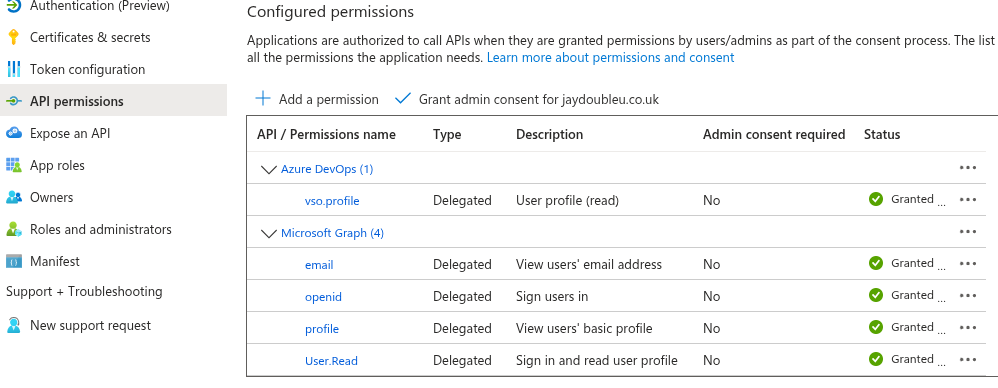
If you don't have admin privileges, a tenant administrator will need to grant consent through the Azure Portal.
Create the Service Principal
The service principal is the identity that users actually authenticate against. It may have been auto-created with the app registration, so we check first:
# Create SP if it doesn't exist (may already exist from app registration)
az ad sp show --id "$APP_ID" > /dev/null 2>&1 || az ad sp create --id "$APP_ID"

SP_OBJECT_ID=$(az ad sp show --id "$APP_ID" --query id -o tsv)

# Require user assignment (only users in the security group can authenticate)
az ad sp update \
  --id "$SP_OBJECT_ID" \
  --set appRoleAssignmentRequired=true123456789
Create Security Group for Authorised Users
Only members of this group can use the MCP server:
GROUP_ID=$(az ad group create \
  --display-name "MCP OAuth2 OBO Server Users (${PREFIX}-${ENV}-${RANDOM_ID})" \
  --mail-nickname "mcp-oauth2-obo-users-${PREFIX}-${ENV}-${RANDOM_ID}" \
  --description "Users authorized to access the MCP OAuth2 OBO Server (${RANDOM_ID})" \
  --query id -o tsv)

echo "Security Group ID: $GROUP_ID"1234567
Optional for this exercise, but consider adding owners to this group so they can manage membership without needing your help:
# Add an owner who can manage group membership
az ad group owner add \
  --group "$GROUP_ID" \
  --owner-object-id "<user-object-id>"1234
Assign the Group to the Application
# Assign the group to the service principal (grants access)
az ad app permission grant \
  --id "$APP_ID" \
  --api "$APP_ID" \
  --scope "access_as_user"

# Create app role assignment for the group
az rest --method POST \
  --uri "https://graph.microsoft.com/v1.0/servicePrincipals/$SP_OBJECT_ID/appRoleAssignedTo" \
  --headers "Content-Type=application/json" \
  --body "{
    \"principalId\": \"$GROUP_ID\",
    \"resourceId\": \"$SP_OBJECT_ID\",
    \"appRoleId\": \"00000000-0000-0000-0000-000000000000\"
  }"123456789101112131415
Add Yourself to the Security Group
# Get your user object ID
MY_USER_ID=$(az ad signed-in-user show --query id -o tsv)

# Add yourself to the group
az ad group member add \
  --group "$GROUP_ID" \
  --member-id "$MY_USER_ID"1234567
Create Federated Identity Credential
This links the Managed Identity to the App Registration, allowing OBO without secrets:
az ad app federated-credential create \
  --id "$APP_ID" \
  --parameters "{
    \"name\": \"mcp-mi-credential-${RANDOM_ID}\",
    \"issuer\": \"https://login.microsoftonline.com/$TENANT_ID/v2.0\",
    \"subject\": \"$MI_PRINCIPAL_ID\",
    \"description\": \"Allows the Managed Identity to authenticate as the application (${RANDOM_ID})\",
    \"audiences\": [\"api://AzureADTokenExchange\"]
  }"123456789
Create a Client Secret (For Local Development)
When developing locally, you can't use Managed Identity. Create a client secret instead:
# Create a secret that expires in 1 year
SECRET=$(az ad app credential reset \
  --id "$APP_ID" \
  --append \
  --years 1 \
  --query password -o tsv)

echo "Client Secret (save this, it won't be shown again): $SECRET"12345678
Store this secret securely. You'll need it for local development.
Summary of Values
At this point, you should have these values saved:
echo "=== Save these values ==="
echo "RANDOM_ID=$RANDOM_ID"  # Keep this for identifying/cleaning up resources
echo "TENANT_ID=$TENANT_ID"
echo "AZURE_CLIENT_ID=$APP_ID"
echo "AZURE_MI_CLIENT_ID=$MI_CLIENT_ID"
echo "CONTAINER_REGISTRY=$CONTAINER_REGISTRY"
echo "CONTAINER_ENV=$CONTAINER_ENV"
echo "CONTAINER_APP=$CONTAINER_APP"
echo "RESOURCE_GROUP=$RESOURCE_GROUP"
echo "SECURITY_GROUP_ID=$GROUP_ID"
echo "SCOPE_ID=$SCOPE_ID"
echo "CLIENT_SECRET=$SECRET"  # For local dev only123456789101112
Save these to a file (e.g., azure-vars.sh) so you can source it later. Add azure-vars.sh to .gitignore since it contains secrets. The RANDOM_ID is particularly important: if you need to find or delete all resources from this deployment later, search for that ID in resource names.
What We've Built
At this point, the Azure infrastructure is ready:
- Resource Group: Container for all resources
- Log Analytics: Centralised logging for the Container App
- Container App Environment: The platform that will run our server
- Container Registry: Where we'll push our Docker image
- Managed Identity: Authenticates to Azure services without secrets
- App Registration: OAuth2 configuration for Entra ID
- Pre-authorised VS Code and Azure CLI as clients
- Defined
access_as_userpermission scope - Requested Graph and DevOps delegated permissions
- Service Principal: What users authenticate against
- Security Group: Controls who can access the MCP server
- Federated Credential: Links Managed Identity to the App Registration
We haven't created the Container App itself yet. We'll do that after building and pushing the Docker image.
Part 3: Build the Server
Now we build the MCP server. We'll use FastMCP[fastmcp] as our framework, which handles the MCP protocol so we can focus on authentication and tools.
A note on code style: This guide prioritises clarity over production polish. You'll see patterns like global state, new HTTP clients per request, and inline imports that wouldn't survive a code review. These simplifications have consequences at scale: connection exhaustion from unshared clients, difficult debugging from swallowed exceptions, and potential compliance issues from verbose logging. We accept these trade-offs because the guide is already lengthy, and adding dependency injection, connection pooling, and proper error handling would double it without teaching anything new about MCP or OAuth2. The Security Considerations section covers what to change before deploying to production.
Project Structure
Create this directory structure:
mcp-server/
├── Dockerfile
├── pyproject.toml
├── src/
│   ├── __init__.py
│   ├── server.py           # Entry point
│   ├── config.py           # Configuration
│   ├── dependencies.py     # FastMCP setup + auth provider
│   ├── auth/
│   │   ├── __init__.py
│   │   ├── jwt_validator.py
│   │   ├── obo_handler.py
│   │   ├── fastmcp_provider.py
│   │   └── service_tokens.py
│   ├── tools/
│   │   ├── __init__.py
│   │   ├── graph_profile.py
│   │   └── devops_profile.py
│   ├── routes/
│   │   ├── __init__.py
│   │   └── health.py
│   └── .env.local          # Local development config (git-ignored)12345678910111213141516171819202122
Create the directories and empty __init__.py files:
mkdir -p mcp-server/src/{auth,tools,routes}
touch mcp-server/src/__init__.py
touch mcp-server/src/{auth,tools,routes}/__init__.py123
Now cd mcp-server and create the following files inside it.
Dependencies (pyproject.toml)
Dependencies are pinned to exact versions tested with this guide. This ensures you get the same experience regardless of when you follow along. For production, consider using a lockfile and regular dependency updates for security patches.
[project]
name = "mcp-oauth2-obo-server"
version = "1.0.0"
description = "MCP Server with OAuth2 OBO Flow"
requires-python = ">=3.11"
dependencies = [
    "fastmcp==2.14.4",
    "uvicorn[standard]==0.40.0",
    "msal==1.34.0",
    "pyjwt[crypto]==2.10.1",
    "httpx==0.28.1",
    "starlette==0.52.1",
    "pydantic==2.12.5",
    "pydantic-settings==2.12.0",
    "python-dotenv==1.2.1",
]

[dependency-groups]
dev = [
    "ruff==0.14.14",
    "mypy==1.19.1",
    "pytest==9.0.2",
    "pytest-asyncio==1.3.0",
]123456789101112131415161718192021222324
Install dependencies with uv:
uv sync1Configuration (src/config.py)
We use Pydantic[pydantic] Settings to load configuration from environment variables with validation:
"""Configuration from environment variables"""

import logging
from pathlib import Path

from dotenv import load_dotenv
from pydantic import Field
from pydantic_settings import BaseSettings, SettingsConfigDict

# Load .env.local for local development
env_path = Path(__file__).parent / ".env.local"
if env_path.exists():
    load_dotenv(env_path)

class Settings(BaseSettings):
    """Application configuration with validation"""

    # Azure Entra ID
    TENANT_ID: str | None = Field(None, alias="AZURE_TENANT_ID")
    CLIENT_ID: str | None = Field(None, alias="AZURE_CLIENT_ID")
    MI_CLIENT_ID: str | None = Field(None, alias="AZURE_MI_CLIENT_ID")

    # Server
    PORT: int = Field(8000, gt=0, le=65535)
    LOG_LEVEL: str = Field("INFO", pattern="^(DEBUG|INFO|WARNING|ERROR|CRITICAL)$")

    # Security
    MAX_TOKEN_AGE_HOURS: int = Field(24, ge=1, le=168)  # 1 hour to 7 days

    # Container App (auto-populated by Azure)
    CONTAINER_APP_NAME: str | None = None
    CONTAINER_APP_ENV_DNS_SUFFIX: str | None = None
    APP_URL: str | None = None

    @property
    def constructed_app_url(self) -> str:
        """Build the application URL from Container App environment"""
        if self.CONTAINER_APP_NAME and self.CONTAINER_APP_ENV_DNS_SUFFIX:
            return f"https://{self.CONTAINER_APP_NAME}.{self.CONTAINER_APP_ENV_DNS_SUFFIX}"
        return self.APP_URL or "http://localhost:8000"

    model_config = SettingsConfigDict(
        env_file=".env.local",
        env_file_encoding="utf-8",
        case_sensitive=True,
        extra="ignore",
    )

settings = Settings()  # type: ignore[call-arg]

# Configure logging
logging.basicConfig(
    level=getattr(logging, settings.LOG_LEVEL),
    format="%(asctime)s - %(name)s - %(levelname)s - %(message)s",
)
logger = logging.getLogger(__name__)

if not settings.TENANT_ID or not settings.CLIENT_ID:
    logger.warning("Missing Azure Entra ID configuration - auth will be disabled")1234567891011121314151617181920212223242526272829303132333435363738394041424344454647484950515253545556575859
The constructed_app_url property is important: Container Apps automatically sets CONTAINER_APP_NAME and CONTAINER_APP_ENV_DNS_SUFFIX, letting us build the public URL without hardcoding it.
JWT Validator (src/auth/jwt_validator.py)
This validates incoming tokens from MCP clients:
"""Azure Entra ID JWT token validation"""

import logging
from datetime import UTC, datetime
from typing import Any

import jwt
from jwt import PyJWKClient

logger = logging.getLogger(__name__)

class AzureJWTValidator:
    """Validates Microsoft Entra ID JWT tokens"""

    def __init__(self, tenant_id: str, client_id: str, max_token_age_hours: int = 24):
        self.tenant_id = tenant_id
        self.client_id = client_id
        self.max_token_age_seconds = max_token_age_hours * 3600

        # JWKS client fetches signing keys from Azure
        self.jwks_client = PyJWKClient(
            f"https://login.microsoftonline.com/{tenant_id}/discovery/v2.0/keys",
            cache_keys=True,
            max_cached_keys=16,
        )

        # Valid issuers for this tenant
        self.valid_issuers = [
            f"https://login.microsoftonline.com/{tenant_id}/v2.0",
            f"https://sts.windows.net/{tenant_id}/",
        ]

    async def validate(self, token: str) -> dict[str, Any] | None:
        """
        Validate JWT token.

        Checks: signature, audience, issuer, expiry, and token age.
        Returns claims dict if valid, None otherwise.
        """
        try:
            # Get signing key from JWKS endpoint
            signing_key = self.jwks_client.get_signing_key_from_jwt(token)

            # Decode and validate standard claims
            claims = jwt.decode(
                token,
                signing_key.key,
                algorithms=["RS256"],
                audience=[self.client_id, f"api://{self.client_id}"],
                issuer=self.valid_issuers,
            )

            # Additional check: reject tokens that are too old
            current_time = datetime.now(UTC).timestamp()
            iat = claims.get("iat")

            if iat:
                token_age = current_time - iat

                if token_age > self.max_token_age_seconds:
                    logger.warning(
                        f"Token rejected: too old ({token_age / 3600:.1f} hours)"
                    )
                    return None

                # Reject future-dated tokens (5-minute clock skew allowed)
                if iat > current_time + 300:
                    logger.warning("Token rejected: issued in the future")
                    return None

            logger.debug(f"Token validated for user: {claims.get('oid')}")
            return dict(claims)

        except jwt.InvalidTokenError as e:
            logger.warning(f"Token validation failed: {e}")
            return None
        except Exception as e:
            logger.error(f"Unexpected validation error: {e}")
            return None12345678910111213141516171819202122232425262728293031323334353637383940414243444546474849505152535455565758596061626364656667686970717273747576777879
The 24-hour age check is arguably redundant since Azure Entra ID already handles token lifetime via the exp claim. We include it here to demonstrate how FastMCP's TokenVerifier supports custom validation logic beyond standard JWT checks. In practice, you'd trust Azure's expiration unless your security model requires tighter constraints.
OBO Handler (src/auth/obo_handler.py)
This exchanges user tokens for service-specific tokens:
"""On-Behalf-Of token exchange handler"""

import logging
import os

import httpx
import msal

logger = logging.getLogger(__name__)

# API scope constants
GRAPH_SCOPE_USER_READ = "https://graph.microsoft.com/User.Read"
DEVOPS_RESOURCE_ID = "499b84ac-1321-427f-aa17-267ca6975798/.default"

class OBOHandler:
    """Handles On-Behalf-Of token exchange with Azure Entra ID"""

    def __init__(self, tenant_id: str, client_id: str, mi_client_id: str | None = None):
        self.tenant_id = tenant_id
        self.client_id = client_id
        self.mi_client_id = mi_client_id
        self.msal_app: msal.ConfidentialClientApplication | None = None

    async def _get_managed_identity_token(self, resource: str) -> str | None:
        """Get token from Managed Identity endpoint (Azure only)"""
        identity_endpoint = os.environ.get("IDENTITY_ENDPOINT")
        identity_header = os.environ.get("IDENTITY_HEADER")

        if not identity_endpoint or not identity_header:
            return None

        params = {
            "resource": resource,
            "api-version": "2019-08-01",
            "client_id": self.mi_client_id,
        }
        headers = {"X-IDENTITY-HEADER": identity_header}

        async with httpx.AsyncClient() as client:
            response = await client.get(
                identity_endpoint, params=params, headers=headers
            )
            if response.status_code == 200:
                return response.json().get("access_token")
        return None

    async def _init_msal(self) -> None:
        """Initialize MSAL with Managed Identity or client secret"""
        if self.msal_app:
            return

        # Try Managed Identity first (only works in Azure)
        mi_endpoint = os.environ.get("IDENTITY_ENDPOINT")

        if mi_endpoint and self.mi_client_id:
            logger.info("Attempting Managed Identity authentication")
            mi_token = await self._get_managed_identity_token("api://AzureADTokenExchange")

            if mi_token:
                self.msal_app = msal.ConfidentialClientApplication(
                    client_id=self.client_id,
                    authority=f"https://login.microsoftonline.com/{self.tenant_id}",
                    client_credential={
                        "client_assertion": mi_token,
                        "client_assertion_type": "urn:ietf:params:oauth:client-assertion-type:jwt-bearer",
                    },
                )
                logger.info("MSAL initialized with Managed Identity")
                return

        # Fallback to client secret (local dev or other clouds)
        client_secret = os.environ.get("AZURE_CLIENT_SECRET", "").strip()

        if client_secret:
            logger.info("Using client secret for MSAL")
            self.msal_app = msal.ConfidentialClientApplication(
                client_id=self.client_id,
                authority=f"https://login.microsoftonline.com/{self.tenant_id}",
                client_credential=client_secret,
            )
        else:
            logger.error("No credentials available for MSAL")

    async def exchange_token_for_graph(
        self, user_token: str, scopes: list[str] | None = None
    ) -> str | None:
        """Exchange user token for Microsoft Graph token"""
        return await self._exchange_token(
            user_token, scopes or [GRAPH_SCOPE_USER_READ], "graph"
        )

    async def exchange_token_for_devops(
        self, user_token: str, scopes: list[str] | None = None
    ) -> str | None:
        """Exchange user token for Azure DevOps token"""
        return await self._exchange_token(
            user_token, scopes or [DEVOPS_RESOURCE_ID], "devops"
        )

    async def _exchange_token(
        self, user_token: str, scopes: list[str], service: str
    ) -> str | None:
        """Perform the OBO token exchange"""
        await self._init_msal()

        if not self.msal_app:
            logger.error(f"MSAL not initialized for {service} OBO")
            return None

        try:
            # Refresh MI assertion if using Managed Identity
            if self.mi_client_id and os.environ.get("IDENTITY_ENDPOINT"):
                mi_token = await self._get_managed_identity_token("api://AzureADTokenExchange")
                if mi_token:
                    self.msal_app.client_credential = {"client_assertion": mi_token}

            result = self.msal_app.acquire_token_on_behalf_of(
                user_assertion=user_token,
                scopes=scopes,
            )

            if "access_token" in result:
                logger.debug(f"OBO exchange successful for {service}")
                return result["access_token"]

            error = result.get("error_description", "Unknown error")
            logger.error(f"{service} OBO failed: {error}")
            return None

        except Exception as e:
            logger.error(f"OBO exchange error for {service}: {e}")
            return None123456789101112131415161718192021222324252627282930313233343536373839404142434445464748495051525354555657585960616263646566676869707172737475767778798081828384858687888990919293949596979899100101102103104105106107108109110111112113114115116117118119120121122123124125126127128129130131132
Two authentication paths:
- Managed Identity (Azure): Gets a token from the local identity endpoint, uses it as a client assertion
- Client Secret (local/other clouds): Uses the traditional secret-based authentication
FastMCP Auth Provider (src/auth/fastmcp_provider.py)
This integrates our JWT validator with FastMCP's auth system:
"""FastMCP authentication provider for Azure Entra ID"""

import logging

from fastmcp.server.auth import AccessToken, RemoteAuthProvider, TokenVerifier
from pydantic import AnyHttpUrl

from .jwt_validator import AzureJWTValidator

logger = logging.getLogger(__name__)

class AzureEntraIDTokenVerifier(TokenVerifier):
    """Verifies Azure Entra ID tokens and stores raw token for OBO"""

    def __init__(self, tenant_id: str, client_id: str, max_token_age_hours: int = 24):
        super().__init__(base_url=None, required_scopes=[])
        self.client_id = client_id  # Store for scope expansion
        self.validator = AzureJWTValidator(tenant_id, client_id, max_token_age_hours)

    async def verify_token(self, token: str) -> AccessToken | None:
        """Verify token and prepare for OBO exchange"""
        claims = await self.validator.validate(token)

        if not claims:
            return None

        # Extract scopes from token
        scope_claim = claims.get("scp", "")
        scopes = scope_claim.split(" ") if scope_claim else []

        # Azure AD puts short scope names in tokens (e.g., "access_as_user")
        # but clients request full URIs (e.g., "api://{client_id}/access_as_user").
        # Add the full URI form so FastMCP's scope validation passes.
        if "access_as_user" in scopes:
            scopes.append(f"api://{self.client_id}/access_as_user")

        return AccessToken(
            token=token,
            client_id=claims.get("oid", ""),
            scopes=scopes,
            expires_at=claims.get("exp"),
            claims={
                **claims,
                "raw_user_token": token,  # Store for OBO exchange
                "user_name": claims.get("name", "Unknown"),
                "user_email": claims.get("email") or claims.get("upn"),
            },
        )

class AzureEntraIDAuthProvider(RemoteAuthProvider):
    """Auth provider with OAuth discovery for MCP clients"""

    def __init__(
        self,
        tenant_id: str,
        client_id: str,
        base_url: str,
        max_token_age_hours: int = 24,
    ):
        # Create token verifier
        token_verifier = AzureEntraIDTokenVerifier(
            tenant_id, client_id, max_token_age_hours
        )

        # Set the scope that clients should request.
        # Note: openid, profile, email are OIDC scopes that control what claims
        # appear in the token, but they don't appear in the 'scp' claim itself.
        # Only our custom scope (access_as_user) appears in scp and can be validated.
        token_verifier.required_scopes = [
            f"api://{client_id}/access_as_user",
        ]

        # Initialize with Azure Entra ID as authorization server.
        # Pass base_url WITHOUT the /mcp path: FastMCP adds it when calling
        # get_routes(mcp_path="/mcp"), constructing the correct RFC 9728
        # discovery URL: /.well-known/oauth-protected-resource/mcp
        super().__init__(
            token_verifier=token_verifier,
            authorization_servers=[
                AnyHttpUrl(f"https://login.microsoftonline.com/{tenant_id}/v2.0")
            ],
            base_url=base_url,
            resource_name="MCP OAuth2 OBO Server",
        )123456789101112131415161718192021222324252627282930313233343536373839404142434445464748495051525354555657585960616263646566676869707172737475767778798081828384
We store the raw token in claims (raw_user_token) for OBO exchange. This is safe because Token A's audience is the MCP server, not Microsoft Graph: an attacker couldn't use it directly against downstream APIs. FastMCP makes this available to our tools.
Service Token Helper (src/auth/service_tokens.py)
A simple helper that tools use to get service tokens:
"""Service token acquisition via OBO flow"""

import logging
from typing import Any

from fastmcp.exceptions import ToolError
from fastmcp.server.dependencies import get_access_token

logger = logging.getLogger(__name__)

async def get_service_token(service: str, scopes: list[str] | None = None) -> str:
    """
    Get a service-specific token using OBO flow.

    Args:
        service: Target service ('graph' or 'devops')
        scopes: Optional scopes (uses defaults if not provided)

    Returns:
        Service-specific access token

    Raises:
        ToolError: If authentication fails
    """
    # Get validated token from FastMCP context
    access_token = get_access_token()
    if not access_token:
        raise ToolError("Authentication required")

    # Extract raw token for OBO
    raw_token = access_token.claims.get("raw_user_token")
    if not raw_token:
        raise ToolError("Unable to retrieve authentication token")

    # Get OBO handler
    from src.dependencies import get_obo_handler
    obo_handler = get_obo_handler()

    if not obo_handler:
        raise ToolError("Authentication service unavailable")

    # Perform token exchange
    if service == "graph":
        service_token = await obo_handler.exchange_token_for_graph(raw_token, scopes)
    elif service == "devops":
        service_token = await obo_handler.exchange_token_for_devops(raw_token, scopes)
    else:
        raise ValueError(f"Unknown service: {service}")

    if not service_token:
        raise ToolError(f"Failed to acquire {service} token - try signing in again")

    return service_token

def get_user_info() -> dict[str, Any]:
    """Get current user information from auth context"""
    access_token = get_access_token()
    if access_token and access_token.claims:
        return {
            "user_id": access_token.client_id,
            "user_name": access_token.claims.get("user_name", "Unknown"),
            "user_email": access_token.claims.get("user_email"),
        }
    return {}12345678910111213141516171819202122232425262728293031323334353637383940414243444546474849505152535455565758596061626364
The Tools
Now we can write our MCP tools. They're simple because all the auth complexity is handled by the layers above.
Graph Profile Tool (src/tools/graph_profile.py):
"""Microsoft Graph profile tool"""

import logging

import httpx

logger = logging.getLogger(__name__)

GRAPH_BASE_URL = "https://graph.microsoft.com/v1.0"

async def graph_get_profile() -> dict:
    """Get the current user's Microsoft 365 profile"""
    from src.auth.service_tokens import get_service_token, get_user_info
    from src.dependencies import mcp

    # Log who's calling
    user_info = get_user_info()
    logger.info(f"graph_get_profile called by {user_info.get('user_name', 'Unknown')}")

    # Get Graph API token via OBO
    graph_token = await get_service_token("graph")

    # Call Microsoft Graph
    async with httpx.AsyncClient() as client:
        response = await client.get(
            f"{GRAPH_BASE_URL}/me",
            headers={"Authorization": f"Bearer {graph_token}"},
        )
        response.raise_for_status()
        return response.json()

# Register with FastMCP - import mcp here to avoid circular imports
def register(mcp_instance):
    """Register this tool with the MCP instance"""
    mcp_instance.tool(name="graph_get_profile")(graph_get_profile)1234567891011121314151617181920212223242526272829303132333435
DevOps Profile Tool (src/tools/devops_profile.py):
"""Azure DevOps profile tool"""

import logging

import httpx

logger = logging.getLogger(__name__)

DEVOPS_PROFILE_URL = "https://app.vssps.visualstudio.com/_apis/profile/profiles/me"
DEVOPS_ACCOUNTS_URL = "https://app.vssps.visualstudio.com/_apis/accounts"

async def devops_get_profile() -> dict:
    """Get the current user's Azure DevOps profile and organisations"""
    from src.auth.service_tokens import get_service_token, get_user_info

    user_info = get_user_info()
    logger.info(f"devops_get_profile called by {user_info.get('user_name', 'Unknown')}")

    # Get DevOps API token via OBO
    devops_token = await get_service_token("devops")
    headers = {"Authorization": f"Bearer {devops_token}"}

    async with httpx.AsyncClient() as client:
        # Get profile
        profile_response = await client.get(
            DEVOPS_PROFILE_URL,
            headers=headers,
            params={"api-version": "7.1"},
        )
        profile_response.raise_for_status()
        profile = profile_response.json()

        # Get organisations
        accounts_response = await client.get(
            DEVOPS_ACCOUNTS_URL,
            headers=headers,
            params={"api-version": "7.1", "memberId": profile.get("id")},
        )

        organisations = []
        if accounts_response.status_code == 200:
            organisations = accounts_response.json().get("value", [])

        return {
            "profile": profile,
            "organisations": organisations,
        }

def register(mcp_instance):
    """Register this tool with the MCP instance"""
    mcp_instance.tool(name="devops_get_profile")(devops_get_profile)123456789101112131415161718192021222324252627282930313233343536373839404142434445464748495051
Dependencies Setup (src/dependencies.py)
This wires everything together:
"""FastMCP setup and dependency management"""

import logging
from contextlib import asynccontextmanager
from typing import TYPE_CHECKING

from fastmcp import FastMCP

from src.auth.fastmcp_provider import AzureEntraIDAuthProvider
from src.auth.obo_handler import OBOHandler
from src.config import settings

if TYPE_CHECKING:
    from collections.abc import AsyncIterator

logger = logging.getLogger(__name__)

# Global OBO handler (initialized at startup)
_obo_handler: OBOHandler | None = None

def get_obo_handler() -> OBOHandler | None:
    """Get the OBO handler instance"""
    return _obo_handler

@asynccontextmanager
async def lifespan(_mcp: FastMCP) -> "AsyncIterator[None]":
    """Lifespan manager - initializes OBO handler at startup"""
    global _obo_handler

    if settings.TENANT_ID and settings.CLIENT_ID:
        _obo_handler = OBOHandler(
            tenant_id=settings.TENANT_ID,
            client_id=settings.CLIENT_ID,
            mi_client_id=settings.MI_CLIENT_ID,
        )
        logger.info("OBO handler initialized")

    yield

    logger.info("MCP server shutting down")

# Configure auth provider if credentials are available
auth_provider = None
if settings.TENANT_ID and settings.CLIENT_ID:
    auth_provider = AzureEntraIDAuthProvider(
        tenant_id=settings.TENANT_ID,
        client_id=settings.CLIENT_ID,
        base_url=settings.constructed_app_url,
        max_token_age_hours=settings.MAX_TOKEN_AGE_HOURS,
    )

# Create FastMCP instance
mcp = FastMCP(
    name="MCP OAuth2 OBO Server",
    instructions="MCP Server with OAuth2 On-Behalf-Of flow for Microsoft services",
    lifespan=lifespan,
    auth=auth_provider,
)

# Register tools
from src.tools import devops_profile, graph_profile

graph_profile.register(mcp)
devops_profile.register(mcp)12345678910111213141516171819202122232425262728293031323334353637383940414243444546474849505152535455565758596061626364
Health Endpoint (src/routes/health.py)
Container Apps needs a health endpoint for liveness and readiness probes:
"""Health check endpoint"""

import os
from datetime import UTC, datetime

from starlette.requests import Request
from starlette.responses import JSONResponse

async def health_check(_request: Request) -> JSONResponse:
    """Health probe for Container Apps"""
    from src.config import settings

    return JSONResponse({
        "status": "healthy",
        "timestamp": datetime.now(UTC).isoformat(),
        "service": "MCP OAuth2 OBO Server",
        "version": "1.0.0",
        "auth_mode": "managed_identity" if os.environ.get("IDENTITY_ENDPOINT")
                     else "client_secret" if os.environ.get("AZURE_CLIENT_SECRET")
                     else "none",
    })123456789101112131415161718192021
The health endpoint is intentionally unauthenticated. Container orchestration platforms (Kubernetes, Container Apps) need to probe it without credentials. This is standard practice for health checks.
The auth_mode field helps with debugging deployment issues. If you're security-conscious about exposing this information, you can remove it or restrict it to internal networks. In practice, knowing the auth mode doesn't give attackers a meaningful advantage: they'd still need valid tokens to access any actual functionality.
Server Entry Point (src/server.py)
Finally, the main entry point:
#!/usr/bin/env python3
"""MCP Server entry point"""

import logging

import uvicorn
from starlette.applications import Starlette

from src.config import settings
from src.dependencies import mcp
from src.routes.health import health_check

logger = logging.getLogger(__name__)

# Register custom routes
mcp.custom_route("/health", methods=["GET"])(health_check)

# Create the ASGI app
app = mcp.http_app(transport="http")

if __name__ == "__main__":
    logger.info("=" * 60)
    logger.info("Starting MCP Server")
    logger.info(f"Tenant ID: {settings.TENANT_ID}")
    logger.info(f"Client ID: {settings.CLIENT_ID}")
    logger.info(f"Port: {settings.PORT}")
    logger.info("=" * 60)

    uvicorn.run(
        app,
        host="0.0.0.0",  # Required for containers
        port=settings.PORT,
        log_level="info",
    )12345678910111213141516171819202122232425262728293031323334
Local Development Setup
Create a .env.local file in the src/ directory (add to .gitignore):
AZURE_TENANT_ID=your-tenant-id
AZURE_CLIENT_ID=your-app-client-id
AZURE_CLIENT_SECRET=your-client-secret
APP_URL=http://localhost:8000
LOG_LEVEL=INFO12345
Run locally from the mcp-server directory:
cd mcp-server
uv run python -m src.server12
The server starts on http://localhost:8000. Verify it's working:
curl http://localhost:8000/health1You should see "auth_mode":"client_secret" in the response. If you see "auth_mode":"none", check that your .env.local file exists in src/ and has the correct values (not placeholders).
Testing with VS Code
With the server running, you can test it using VS Code with GitHub Copilot.
Open VS Code and add a new MCP server:
- Open Command Palette (
Ctrl+Shift+PorCmd+Shift+P) - Search for "MCP: Add Server"
- Select "HTTP" as the server type
- Set the URL to
http://localhost:8000/mcp - Give it a name (e.g., "Local OBO Server")
After adding the server, VS Code will prompt you to authenticate against Entra ID:
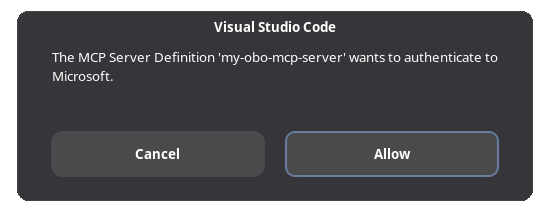
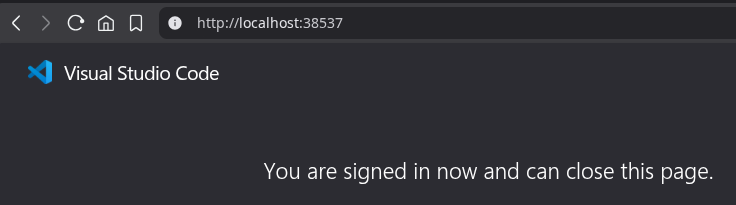
Click "Allow" and your browser will open, redirecting you to Entra ID for authentication. Sign in with your credentials and you should see a confirmation message from VS Code:
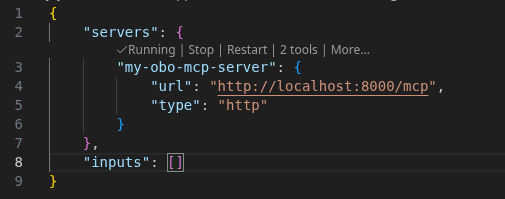
When you return to VS Code, you should see your mcp.json configuration file open with the server status showing "Running" and "2 tools" available:
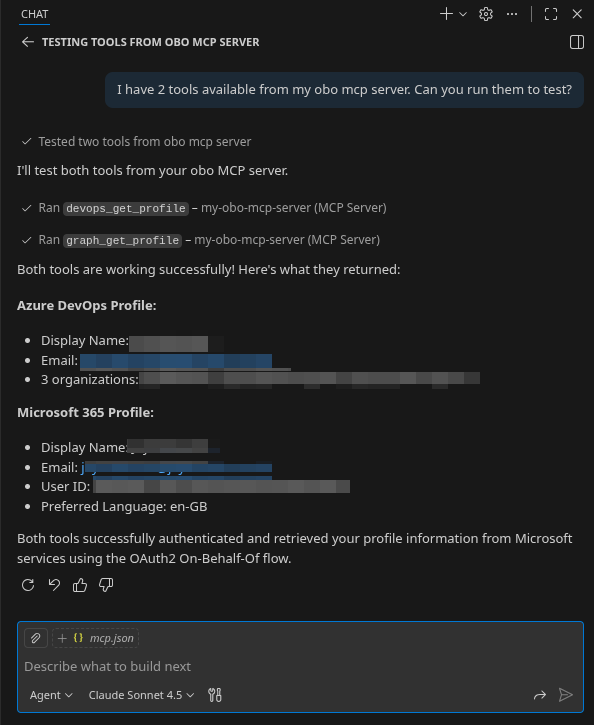
Now open the GitHub Copilot chat window to test the tools. You can ask it something like:
"I have 2 tools available from my OBO MCP server. Can you run them to test?"
If everything is working, you should see results similar to this:
Testing with Azure CLI
You can also test manually using Azure CLI to get an access token. This is useful when testing with other MCP clients or debugging authentication issues.
Get an access token (replace the client ID with your MCP Server App Registration's client ID):
TOKEN=$(az account get-access-token \
    --scope "api://YOUR_CLIENT_ID/access_as_user" \
    --query accessToken -o tsv)123
You can use this token with any MCP client by setting the Authorization header to Bearer $TOKEN.
To test without an MCP client, you can use curl directly:
# Initialize a session
SESSION_ID=$(curl -s -o /dev/null -w '%header{mcp-session-id}' \
    -X POST "http://localhost:8000/mcp" \
    -H "Authorization: Bearer $TOKEN" \
    -H "Content-Type: application/json" \
    -H "Accept: application/json, text/event-stream" \
    -d '{"jsonrpc": "2.0", "method": "initialize", "params": {"protocolVersion": "2024-11-05", "capabilities": {}, "clientInfo": {"name": "curl", "version": "1.0"}}, "id": 1}')

echo "Session ID: $SESSION_ID"

# List available tools
curl -s -X POST "http://localhost:8000/mcp" \
    -H "Authorization: Bearer $TOKEN" \
    -H "Content-Type: application/json" \
    -H "Accept: application/json, text/event-stream" \
    -H "Mcp-Session-Id: $SESSION_ID" \
    -d '{"jsonrpc": "2.0", "method": "tools/list", "id": 2}'1234567891011121314151617
This should return a JSON response listing the available tools:
Session ID: 692c0784dca642c786869f098032cd9a
event: message
data: {"jsonrpc":"2.0","id":2,"result":{"tools":[{"name":"graph_get_profile","description":"Get the current user's Microsoft 365 profile",...},{"name":"devops_get_profile","description":"Get the current user's Azure DevOps profile and organisations",...}]}}123
Congratulations, you now have your OBO MCP server working locally.
Best Practice: Combining Tools
Remember, we built two separate tools for teaching purposes. In production, you'd likely combine them:
async def get_user_context() -> dict:
    """Get combined user context from all sources"""
    import asyncio

    # Fetch from both services in parallel
    graph_task = asyncio.create_task(fetch_graph_profile())
    devops_task = asyncio.create_task(fetch_devops_profile())

    graph_profile, devops_profile = await asyncio.gather(
        graph_task, devops_task, return_exceptions=True
    )

    # Combine and deduplicate
    return {
        "name": graph_profile.get("displayName"),
        "email": graph_profile.get("mail"),
        "job_title": graph_profile.get("jobTitle"),
        "department": graph_profile.get("department"),
        "devops_organisations": [
            org.get("accountName") for org in devops_profile.get("organisations", [])
        ],
    }12345678910111213141516171819202122
This returns concise, deduplicated information that's useful to the MCP client without wasting context window on raw API responses.
Part 4: Containerise and Deploy
Now we'll package the server into a Docker image and deploy it to Azure Container Apps.
Dockerfile
Create a Dockerfile in the mcp-server/ directory (alongside src/ and pyproject.toml). We use a multi-stage build to keep the final image small:
# Multi-stage build for optimized image size
FROM python:3.11-slim AS builder

WORKDIR /app

# Install uv for fast dependency installation
RUN pip install --no-cache-dir uv==0.7.0

# Copy dependency file and install
COPY pyproject.toml .
RUN uv pip install --system --no-cache .

# Final stage
FROM python:3.11-slim

WORKDIR /app

# Prevent Python from writing .pyc files (not needed in containers)
ENV PYTHONDONTWRITEBYTECODE=1

# Create non-root user for security
RUN useradd -m -u 1000 appuser && chown -R appuser:appuser /app

# Copy Python packages from builder
COPY --from=builder /usr/local/lib/python3.11/site-packages /usr/local/lib/python3.11/site-packages
COPY --from=builder /usr/local/bin /usr/local/bin

# Copy application code
COPY --chown=appuser:appuser src/ ./src/

# Switch to non-root user
USER appuser

# Container Apps sets PORT environment variable
EXPOSE 8000

# Health check for container orchestration
HEALTHCHECK --interval=30s --timeout=3s --start-period=10s --retries=3 \
    CMD python -c "import urllib.request; urllib.request.urlopen('http://localhost:8000/health')" || exit 1

# Run with uvicorn
CMD ["uvicorn", "src.server:app", "--host", "0.0.0.0", "--port", "8000"]123456789101112131415161718192021222324252627282930313233343536373839404142
Key points:
- Multi-stage build: The builder stage installs dependencies, the final stage only copies what's needed
- Non-root user: Running as
appuser(UID 1000) instead of root is a security best practice - Health check: Container Apps uses this to know when the container is ready
Build and Push to ACR
Make sure you have the variables from Part 2:
# If you saved them to a file, source it:
# source ./azure-vars.sh

# Or set them again:
CONTAINER_REGISTRY="acrmcpdev${RANDOM_ID}"
RESOURCE_GROUP="rg-mcp-dev-${RANDOM_ID}"123456
Log in to your Container Registry:
az acr login --name "$CONTAINER_REGISTRY"1Build and push the image:
# Build from the mcp-server/ directory where Dockerfile lives
docker build -t "${CONTAINER_REGISTRY}.azurecr.io/mcp-server:latest" .

# Push to ACR
docker push "${CONTAINER_REGISTRY}.azurecr.io/mcp-server:latest"12345
Alternatively, you can build directly in ACR (useful if you don't have Docker locally):
az acr build \
  --registry "$CONTAINER_REGISTRY" \
  --image mcp-server:latest .123
Create the Container App
Now we create the Container App with all the environment variables it needs:
# Get the values we need
ACR_LOGIN_SERVER=$(az acr show \
  --name "$CONTAINER_REGISTRY" \
  --resource-group "$RESOURCE_GROUP" \
  --query loginServer -o tsv)

az containerapp create \
  --name "$CONTAINER_APP" \
  --resource-group "$RESOURCE_GROUP" \
  --environment "$CONTAINER_ENV" \
  --image "${ACR_LOGIN_SERVER}/mcp-server:latest" \
  --registry-server "$ACR_LOGIN_SERVER" \
  --registry-identity "$MI_RESOURCE_ID" \
  --user-assigned "$MI_RESOURCE_ID" \
  --target-port 8000 \
  --ingress external \
  --min-replicas 0 \
  --max-replicas 10 \
  --cpu 0.25 \
  --memory 0.5Gi \
  --env-vars \
    "AZURE_TENANT_ID=$TENANT_ID" \
    "AZURE_CLIENT_ID=$APP_ID" \
    "AZURE_MI_CLIENT_ID=$MI_CLIENT_ID" \
    "PORT=8000" \
    "LOG_LEVEL=INFO"1234567891011121314151617181920212223242526
Let's break down the important flags:
--registry-identity: Uses Managed Identity to pull images (no registry password needed)--user-assigned: Attaches our Managed Identity for OBO authentication--ingress external: Makes the app publicly accessible via HTTPS--min-replicas 0: Scales to zero when idle (cost savings)--max-replicas 10: Scales up under load
Get the Application URL
APP_URL=$(az containerapp show \
  --name "$CONTAINER_APP" \
  --resource-group "$RESOURCE_GROUP" \
  --query properties.configuration.ingress.fqdn -o tsv)

echo "Application URL: https://${APP_URL}"123456
Verify Deployment
Check the health endpoint:
curl "https://${APP_URL}/health" | jq1This might take a few seconds on the first request as the instance boots from a cold start.
You should see:
{
  "status": "healthy",
  "timestamp": "2025-01-23T14:30:00.000000+00:00",
  "service": "MCP OAuth2 OBO Server",
  "version": "1.0.0",
  "auth_mode": "managed_identity"
}1234567
The auth_mode: managed_identity confirms the server detected it's running in Azure and will use Managed Identity for OBO.
Check the OAuth Discovery Endpoint
MCP clients use this endpoint to discover how to authenticate. Per RFC 9728, the path includes the protected resource path (/mcp):
curl "https://${APP_URL}/.well-known/oauth-protected-resource/mcp" | jq1You should see something like:
{
  "resource": "https://ca-mcp-dev-xxxx.....azurecontainerapps.io/mcp",
  "authorization_servers": [
    "https://login.microsoftonline.com/{tenant-id}/v2.0"
  ],
  "scopes_supported": [
    "api://{client-id}/access_as_user"
  ],
  "bearer_methods_supported": [
    "header"
  ],
  "resource_name": "MCP OAuth2 OBO Server"
}12345678910111213
This returns metadata telling clients:
- Which authorization server to use (Azure Entra ID)
- What scopes to request (
api://{client_id}/access_as_user) - Where to send authenticated requests
Like the health endpoint, this discovery endpoint is intentionally public. OAuth discovery (RFC 9728) requires clients to fetch metadata before authenticating, so it must be accessible without credentials. The metadata only describes how to authenticate, not any sensitive data.
View Logs (Troubleshooting)
If something isn't working, check the logs:
az containerapp logs show \
  --name "$CONTAINER_APP" \
  --resource-group "$RESOURCE_GROUP" \
  --follow1234
Common issues:
- "Missing Azure Entra ID configuration": Environment variables not set correctly
- "MSAL not initialized": Managed Identity not attached or federated credential missing
- 401 on /mcp: Token validation failing (check audience in app registration)
Update the Application
When you make code changes:
# Rebuild and push (from the mcp-server/ directory)
docker build -t "${CONTAINER_REGISTRY}.azurecr.io/mcp-server:latest" .
docker push "${CONTAINER_REGISTRY}.azurecr.io/mcp-server:latest"

# Force a new revision to pull the updated image
az containerapp update \
  --name "$CONTAINER_APP" \
  --resource-group "$RESOURCE_GROUP" \
  --image "${CONTAINER_REGISTRY}.azurecr.io/mcp-server:latest" \
  --revision-suffix "v$(date +%s)"12345678910
Why the revision suffix? Azure Container Apps pulls images based on digest, not just the tag. If you push a new image with the same :latest tag, running az containerapp update without a revision suffix often has no effect: the platform sees the same tag, assumes nothing changed, and skips the pull. This is a known issue dating back to 2022.
Microsoft recommends using az containerapp revision copy with unique image tags (like commit SHAs). For this guide, we use --revision-suffix with a timestamp to force a new revision without tracking individual tags.
Summary of Deployed Resources
At this point you have:
| Resource | Purpose |
|---|---|
| Container Registry | Stores your Docker images |
| Container App | Runs your MCP server |
| Managed Identity | Authenticates to ACR and Entra ID (no secrets) |
| App Registration | OAuth2 configuration for your server |
| Security Group | Controls who can authenticate |
The server is running, publicly accessible via HTTPS, and ready to accept authenticated MCP requests.
Part 5: Connect and Test
Testing the deployed server follows the same steps as local testing. The only difference is the URL: instead of http://localhost:8000/mcp, use your Container App URL: https://${APP_URL}/mcp.
Follow the Testing with VS Code and Testing with Azure CLI sections from earlier, replacing http://localhost:8000/mcp with your deployed URL:
echo "https://${APP_URL}/mcp"1Authentication Flow Walkthrough
When you first invoke an MCP tool from VS Code, here's what happens behind the scenes:
Step 1: MCP Client discovers authentication requirements
VS Code sends a request to your server. The server responds with a 401 Unauthorized and a WWW-Authenticate header pointing to the OAuth discovery endpoint:
WWW-Authenticate: Bearer resource="https://ca-mcp-dev-a1b2.../mcp"1The client then fetches /.well-known/oauth-protected-resource/mcp to learn:
- Which authorization server to use (Azure Entra ID)
- What scopes to request (
api://{client_id}/access_as_user)
Step 2: User authenticates with Azure Entra ID
The MCP client opens a browser window (or tab) to the Azure Entra ID login page. You'll see the standard Microsoft sign-in experience:
- Enter your email address
- Enter your credentials
- Complete MFA (hopefully required by your tenant policies)
If this is your first time, you may see a consent screen asking you to grant the MCP server access to your profile. Since we pre-authorised VS Code and Azure CLI in Part 2, this consent prompt is minimal.
Step 3: Token is issued to the MCP client
After successful authentication, Azure Entra ID redirects back to the MCP client with an authorization code. The client exchanges this for an access token. This is Token A from our earlier diagram: its audience is your MCP server, not Microsoft Graph.
Step 4: MCP client sends authenticated requests
Every subsequent request to your MCP server includes the token in the Authorization header:
Authorization: Bearer eyJ0eXAiOiJKV1QiLCJhbGciOiJSUzI1NiIsIng1dCI...1Your server validates this token (signature, audience, issuer, expiry, age) and extracts the user's identity. If validation passes, the request proceeds.
Step 5: OBO exchange happens per-request
When your tool needs to call Microsoft Graph or Azure DevOps, it exchanges Token A for Token B using the On-Behalf-Of flow. This happens invisibly to the user. Token B is scoped narrowly (only User.Read for Graph, only vso.profile for DevOps). MSAL caches these tokens in memory to avoid redundant exchanges within their lifetime.
Troubleshooting Common Issues
"Authentication required" error
The MCP client didn't send a token, or the token wasn't recognised. Check:
- The server URL ends with
/mcp - VS Code has the MCP server configured correctly
- Try reloading VS Code and authenticating again
"Failed to acquire graph token" or "devops token"
The OBO exchange failed. Common causes:
- You're not a member of the security group created in Part 2
- The app registration doesn't have the required API permissions
- Admin consent hasn't been granted
Check your group membership:
# Get your user ID
MY_USER_ID=$(az ad signed-in-user show --query id -o tsv)

# Check if you're in the group
az ad group member check \
  --group "$GROUP_ID" \
  --member-id "$MY_USER_ID"1234567
"Token validation failed"
The token signature, audience, or issuer didn't match. Check:
AZURE_CLIENT_IDenvironment variable matches your app registrationAZURE_TENANT_IDis correct- The token hasn't expired (try signing out and back in)
Server logs show "MSAL not initialized"
The server couldn't authenticate itself. In Azure, this means the Managed Identity isn't working:
- Verify the user-assigned identity is attached to the Container App
- Check the federated credential exists on the app registration
- Confirm
AZURE_MI_CLIENT_IDis set correctly
For local development with client secret:
- Ensure
AZURE_CLIENT_SECRETis set in your.env.local - Verify the secret hasn't expired
Copilot says "I don't have access to that tool"
The MCP server isn't connected. In VS Code:
- Open the command palette (
Cmd+Shift+P) - Search for "MCP" to see available MCP commands
- Check if your server appears in the list
- If not, verify your
settings.jsonconfiguration
Verify the Security Model
Let's confirm the OBO flow is working as intended. In your server logs, you should see entries like:
INFO - graph_get_profile called by Jane Smith
DEBUG - OBO exchange successful for graph12
This confirms:
- The user's identity was extracted from the incoming token
- The OBO exchange succeeded
- The API call used a token specific to that user
If you have access to Azure Entra ID sign-in logs (in the Azure Portal under Microsoft Entra ID > Sign-in logs), you'll see two distinct token acquisitions:
- The initial authentication (user to MCP server)
- The OBO exchange (MCP server to Graph/DevOps on behalf of user)
The second entry shows the MCP server's identity as the app, but the user's identity is preserved in the "on behalf of" field. This is exactly what we want: the server is acting as a delegate, not as itself.
Part 6: Extending and Hardening
You now have a working MCP server with OAuth2 OBO flow. This final section covers extending it with more tools, preparing for higher-traffic deployments, and cleaning up when you're done.
Adding More Tools
The pattern you've learned works for any Microsoft service that supports delegated permissions. Here are some tools you might add:
Email tools (Microsoft Graph)
# Requires Mail.Read scope
async def list_recent_emails(count: int = 10) -> list[dict]:
    """List the user's recent emails"""
    token = await get_service_token("graph", ["https://graph.microsoft.com/Mail.Read"])
    async with httpx.AsyncClient() as client:
        response = await client.get(
            f"https://graph.microsoft.com/v1.0/me/messages?$top={count}&$orderby=receivedDateTime desc",
            headers={"Authorization": f"Bearer {token}"},
        )
        response.raise_for_status()
        return response.json().get("value", [])1234567891011
Calendar tools (Microsoft Graph)
# Requires Calendars.Read scope
async def get_todays_meetings() -> list[dict]:
    """Get meetings scheduled for today"""
    token = await get_service_token("graph", ["https://graph.microsoft.com/Calendars.Read"])
    # ... implementation12345
Work items (Azure DevOps)
# Requires vso.work scope
async def list_my_work_items(organisation: str, project: str) -> list[dict]:
    """List work items assigned to the current user"""
    token = await get_service_token("devops", ["499b84ac-1321-427f-aa17-267ca6975798/vso.work"])
    # ... implementation12345
Write operations
Write operations require different scopes. For example:
- Sending email needs
Mail.Sendinstead ofMail.Read - Creating work items needs
vso.work_writeinstead ofvso.work
Add these scopes to your app registration:
# Add Mail.Send permission
az ad app permission add \
  --id "$APP_ID" \
  --api "00000003-0000-0000-c000-000000000000" \
  --api-permissions "e383f46e-2787-4529-855e-0e479a3ffac0=Scope"

# Grant admin consent for new permissions
az ad app permission admin-consent --id "$APP_ID"12345678
Then request the scope in your tool:
async def send_email(to: str, subject: str, body: str) -> dict:
    """Send an email on behalf of the user"""
    token = await get_service_token("graph", ["https://graph.microsoft.com/Mail.Send"])
    # ... implementation1234
Production Considerations
This guide is for demonstration and proof-of-concept purposes. For production deployments, start fresh with the latest FastMCP version rather than adapting this code directly. The authentication patterns and architecture remain relevant, but you'll want to build on current tooling and best practices.
For higher-traffic or business-critical deployments, consider these enhancements:
Observability
Application Insights provides distributed tracing across your MCP server and the Azure services it calls. You can trace a request from the MCP client through OBO exchange to the downstream API and back. Add the OpenTelemetry SDK to your server and configure the Application Insights connection string as an environment variable.
Alerting
Set up alerts for:
- Authentication failures (sudden spikes may indicate attack or misconfiguration)
- OBO exchange failures (may indicate token or permission issues)
- Container restarts (may indicate application crashes)
- High latency on downstream API calls
Azure Monitor can trigger alerts based on log queries or metrics thresholds.
Rate limiting
If your MCP server is publicly accessible beyond your organisation, consider adding rate limiting to prevent abuse. You can implement this at the application level with a library like slowapi, or at the infrastructure level with Azure Front Door or API Management.
Resilience patterns
The OBO exchange depends on Azure Entra ID availability. For critical workloads, implement:
- Circuit breaker pattern: Stop making requests to a failing service temporarily
- Retry with exponential backoff: Handle transient failures gracefully
- Timeout configuration: Don't let slow responses block other requests
Libraries like tenacity (Python) make these patterns straightforward to implement.
Security Hardening Checklist
Review these items before considering your deployment complete:
Secret rotation (non-Azure deployments)
If you're using client secrets instead of Managed Identity:
- Set calendar reminders before secrets expire
- Use Azure Key Vault to store secrets with automatic rotation
- Have a process to update secrets without downtime
Monitor authentication failures
Set up log alerts for patterns that might indicate attack:
- Multiple failed authentications from the same IP
- Authentication attempts for users not in the security group
- Unusual geographic patterns in successful authentications
# Example: Query recent auth failures in Container Apps logs
az monitor log-analytics query \
  --workspace "$LOG_ANALYTICS_WORKSPACE_ID" \
  --analytics-query "ContainerAppConsoleLogs_CL | where Log_s contains 'Token validation failed' | summarize count() by bin(TimeGenerated, 1h)"1234
Review API permissions periodically
Over time, you may add permissions that are no longer needed. Review quarterly:
# List current permissions
az ad app permission list --id "$APP_ID" -o table12
Remove permissions you no longer use. Principle of least privilege should be maintained throughout the application lifecycle, not just at initial deployment.
Conditional Access policies
Consider implementing Conditional Access policies in Entra ID:
- Require MFA for access to the MCP server
- Block access from untrusted locations
- Require compliant devices
- Set session lifetime limits
These policies apply at authentication time and don't require changes to your MCP server code.
Cleanup
When you're done experimenting or need to tear down the deployment, use the RANDOM_ID to identify and delete all resources.
Delete the resource group (removes Container App, Registry, Log Analytics, Managed Identity):
az group delete --name "rg-mcp-dev-${RANDOM_ID}" --yes --no-wait1Delete the app registration:
APP_ID=$(az ad app list --display-name "MCP OAuth2 OBO Server (mcp-dev-${RANDOM_ID})" --query "[0].appId" -o tsv)
az ad app delete --id "$APP_ID"12
Delete the service principal (usually deleted with the app, but verify):
SP_ID=$(az ad sp list --display-name "MCP OAuth2 OBO Server (mcp-dev-${RANDOM_ID})" --query "[0].id" -o tsv)
if [ -n "$SP_ID" ]; then
  az ad sp delete --id "$SP_ID"
fi1234
Delete the security group:
GROUP_ID=$(az ad group list --display-name "MCP OAuth2 OBO Server Users (mcp-dev-${RANDOM_ID})" --query "[0].id" -o tsv)
az ad group delete --group "$GROUP_ID"12
If you've lost the RANDOM_ID, you can find resources by searching:
# Find app registrations containing your prefix
az ad app list --query "[?contains(displayName, 'MCP OAuth2 OBO Server')].{name:displayName, id:appId}" -o table

# Find resource groups
az group list --query "[?contains(name, 'rg-mcp-')].name" -o table12345
Security Considerations
This guide focused on authentication mechanics, but production MCP deployments require broader security thinking. MCP servers are fundamentally different from traditional APIs: they combine user data with LLM queries, support features like sampling[sampling] (letting servers borrow the client's LLM for their own inference), and can connect to external inference endpoints. What gets logged, who can access it, and how data flows through the system all need careful consideration.
The OWASP MCP Top 10[owasp-mcp] identifies the key risks for MCP systems. Here's how this guide addresses them:
| Risk | What We Cover | What We Don't Cover |
|---|---|---|
| MCP01: Token Mismanagement | Managed Identity (no secrets to manage), OBO flow (short-lived tokens), federated credentials, JWT validation | Federated credentials for CI/CD |
| MCP02: Scope Creep | Defined scopes per API, group-based access control | App Roles, PIM time-bound access, periodic reviews |
| MCP03: Tool Poisoning | N/A | Tool registry governance, pre-deployment inspection |
| MCP04: Supply Chain | Multi-stage Docker builds, pinned dependencies | Dependency scanning in CI, SBOM, private artifact feeds |
| MCP05: Command Injection | API calls only (no shell execution), slim container image | N/A |
| MCP06: Prompt Injection | Input validation on tool parameters (defense-in-depth) | LLM-level defenses (client responsibility) |
| MCP07: Auth & Authorisation | OAuth2 + OBO, JWT validation, group-based access, unique App Registration | RFC 8707 resource indicators, APIM gateway, network isolation |
| MCP08: Audit & Telemetry | Basic Python logging, user action tracking, Container Apps log streaming | Structured queries, dashboards, Application Insights, OpenTelemetry |
| MCP09: Shadow Servers | N/A | Azure Policy enforcement, Defender discovery |
| MCP10: Context Over-Sharing | N/A | Tenant-scoped storage, context boundaries |
This guide provides solid foundations for MCP01, MCP02, MCP04, MCP05, MCP07, and MCP08. MCP06 (prompt injection) is a client-side concern outside our scope. The remaining risks (MCP03, MCP09, MCP10) require additional architectural patterns: tool registries, Azure Policy enforcement, and tenant isolation. A future article will cover these enterprise patterns in depth.
Here are specific areas a security review would examine in this implementation. As noted in Part 3, this guide prioritises clarity over production polish. The "issues" below are intentional simplifications: verbose health endpoints, detailed logging, and public ingress all make learning and debugging easier.
Public Ingress
The Container App is set to ingress: external and exposed directly to the internet. For a demo or low-risk internal tool, this is fine. For production workloads handling sensitive data, you'd typically front this with Azure Front Door (with WAF enabled) to block malicious requests before they reach your code. For internal-only services, consider deploying to a private VNet with no public endpoint at all.
Rate Limiting
The code doesn't implement rate limiting. An attacker (or a broken agent loop) could hammer your endpoint, causing the server to spam Entra ID with OBO token requests. At best, this increases costs. At worst, it triggers tenant-wide throttling that affects other applications.
Azure API Management can enforce rate limits at the gateway. Alternatively, implement application-level rate limiting using libraries like slowapi or Redis-backed counters.
Information Disclosure
The /health endpoint returns configuration details:
{"status": "healthy", "auth_mode": "managed_identity"}1As noted in Part 3, knowing the auth mode doesn't give attackers direct access since they'd still need valid tokens. However, security-conscious environments prefer minimal information exposure: return 200 OK or 500 Error, nothing more. Move configuration details to your monitoring systems.
Logging and PII
The code logs user names:
logger.info(f"graph_get_profile called by {user_info.get('user_name', 'Unknown')}")1We include this for demonstration purposes: it makes verifying tool calls in Log Analytics straightforward. In traditional applications, sensitive data flows between APIs and databases without being written to centralised logging. MCP servers are different: they sit at the intersection of user identity, LLM queries, and business data, so everything flowing through them is potentially sensitive.
For regulated industries (GDPR, HIPAA), logging PII like user names or email addresses requires strict retention policies and access controls. Consider logging the user's Object ID (OID) instead, which is traceable but pseudo-anonymous. Never log full tokens, query content, or response data without explicit data classification.
Further Reading
Microsoft has published detailed guidance in their MCP Azure Security Guide[ms-mcp-security], covering defence-in-depth architectures, Azure service patterns for each OWASP risk, and lessons learned from enterprise deployments. Essential reading before deploying MCP servers in production.
A future article will explore these security patterns in depth: MCP gateways[mcp-gateway] that centralise authentication and rate limiting through Azure API Management, MCP registries[mcp-registry] that provide governance over which tools are approved for use, multi-tenant isolation patterns, and the telemetry challenges specific to AI workloads where queries and responses themselves become sensitive data.
What You've Built
This guide walked through building an MCP server that:
- Authenticates securely using OAuth2 On-Behalf-Of flow, ensuring tokens are scoped to specific services
- Runs without secrets in Azure using Managed Identity and federated credentials
- Preserves user identity through token exchanges, maintaining audit trails and permission boundaries
- Scales automatically on Azure Container Apps, including scale-to-zero for cost efficiency
- Integrates with multiple services (Microsoft Graph and Azure DevOps) using the same pattern
Along the way, you've gained hands-on experience with technologies that are increasingly in demand in the modern workplace:
- Python async programming and the FastMCP framework
- Docker multi-stage builds and container security practices
- Azure Container Apps and serverless container hosting
- Managed Identities and federated credentials
- Azure Entra ID app registrations, scopes, and consent
- OAuth2 token validation and the On-Behalf-Of flow
- MCP protocol and client configuration
These skills transfer directly to building other integrations. The OBO pattern works for any service that supports delegated permissions: SharePoint, OneDrive, Teams, Dynamics 365, Power Platform, and third-party APIs registered in Entra ID.
The container deployment patterns apply beyond MCP servers. Any Python web service benefits from the same Dockerfile structure, health endpoints, and Managed Identity integration.
What We Didn't Cover
This guide focused on MCP tools[mcp-tools], but the protocol supports several other primitives:
| Primitive | Description |
|---|---|
| Tools | Executable functions that AI applications invoke to perform actions (this guide) |
| Resources[mcp-resources] | Data sources that provide contextual information, identified by URIs |
| Prompts[mcp-prompts] | Reusable templates that structure interactions with language models |
| Sampling[sampling] | Allows servers to request LLM completions through the client |
| Elicitation[mcp-elicitation] | Allows servers to request additional information from users |
FastMCP 2.14.x (December 2025) added two features not covered in this guide:
- Background Tasks[fastmcp-tasks] - Long-running operations that report progress without blocking clients, useful for expensive computations or batch processing
- Sampling with Tools[fastmcp-sampling] - Enables servers to spawn agentic loops using the client's LLM, where the server passes tools to
ctx.sample()and FastMCP handles the loop: calling the LLM, executing tools, and feeding results back until a final response is produced
Future articles will explore resources and prompts in depth, showing how to expose file systems, database schemas, and structured templates to AI agents.
Extending the Pattern
This guide demonstrated two tools (graph_get_profile and devops_get_profile), but the same OBO pattern scales to full Microsoft 365 integration. The accelerator[accelerator] this guide is based on includes 40 tools across three services:
Microsoft Graph (User.Read, Mail.Read, Calendars.Read):
graph_get_emails- Retrieve recent emails from user's mailboxgraph_get_calendar- Retrieve upcoming calendar events
SharePoint (Sites.Read.All, Files.ReadWrite.All):
sharepoint_list_sites,sharepoint_search_sites- Discover accessible sitessharepoint_get_list_items,sharepoint_create_list_item,sharepoint_update_list_item- Full CRUD on SharePoint listssharepoint_search_files,sharepoint_download_file,sharepoint_upload_file- Document library operations
Azure DevOps (vso.work_write, vso.build_execute, vso.wiki_write):
devops_search_work_items,devops_create_work_item,devops_update_work_item- Work item management with WIQL queriesdevops_list_build_definitions,devops_trigger_build,devops_get_build_status- Pipeline automationdevops_search_wiki,devops_create_wiki_page,devops_update_wiki_page- Wiki content management with ETag conflict detection
Each tool follows the same pattern: acquire a scoped OBO token, call the API, return structured data. Write operations request additional scopes (like vso.work_write) while read operations use the base scopes configured in the app registration.
A Note on FastMCP Versions
This guide uses FastMCP 2.x[fastmcp], based on code written when I had time to explore MCP more deeply last year. Recent 2.x releases have added features we didn't cover: completions for auto-completing tool arguments, background tasks for long-running operations, and OpenAPI provider for exposing REST APIs as MCP tools (though this is considered an anti-pattern[openapi-antipattern] best reserved for bootstrapping, not production).
FastMCP 3.0[fastmcp3] is now in beta, introducing a fundamentally new architecture built around components, providers, and transforms. It enables composition patterns like proxying remote servers, filesystem-based component discovery with hot-reload, and per-component authorisation. If you're starting fresh, consider the beta. Updated guides will cover the new capabilities.
Why Container Apps?
This guide uses Azure Container Apps[aca] because it suits the stateless nature of OBO-authenticated MCP servers. Each request is independent: validate the token, exchange it via OBO, call the downstream API, return the result. No session state, no sticky connections, no shared memory between requests.
Container Apps can scale to zero when idle, meaning you pay nothing when your MCP server isn't being used. When a request arrives, cold start spins up a container in seconds. For a personal or team MCP server with sporadic usage, this keeps costs minimal (often under $5/month).
Azure offers other hosting options for MCP servers, each with different trade-offs:
| Option | Strengths | Complexity |
|---|---|---|
| Container Apps | Scale-to-zero, simple deployment, good for stateless (this guide) | Low |
| Azure Functions[functions-mcp] | Native MCP support, event-driven, consumption billing | Medium |
| API Management[apim-mcp] | Gateway features, policies, multi-backend routing | High |
| Kubernetes (AKS) | Full control, complex deployments, stateful workloads | High |
Future articles will cover Azure Functions with native MCP support and API Management patterns over the course of 2026. Subscribe to the RSS feed to stay tuned.
As AI tools become more capable, the ability to connect them securely to enterprise data becomes more valuable. You now have a solid foundation for building those connections, and the understanding to extend this pattern to whatever services your organisation needs to integrate.
What Will You Build?
Hopefully this guide provides a good starting point for getting interested in MCP and its usefulness. Think of it as an all-you-can-eat buffet for your team: construct MCP tools around the services your team cares about in daily work, expose them securely, and shape them so they actually help your workstream. No more context-switching between dashboards, no more copy-pasting between systems.
Most AI assistants and agents now support MCP. Build once, consume everywhere. Developers have their preferred tools, others have theirs. You could even build your own custom MCP client using FastMCP[fastmcp] (which supports building clients, not just servers) or other agent frameworks.
I'll let your imagination take it from here. What would you build to accelerate your team?
In this context, "agent" refers to AI-powered software that can take actions on behalf of the user: writing code, searching files, calling APIs. The MCP client is the component that connects agents to MCP servers.
↩Model Context Protocol is an open standard for connecting AI models to external tools and data sources.
↩Azure DevOps provides developer services for version control, CI/CD, project tracking, and more.
↩Microsoft Graph is the unified API for accessing Microsoft 365 data: users, mail, calendar, files, and more.
↩OAuth 2.0 On-Behalf-Of flow allows a service to request tokens for downstream APIs while preserving the user's identity.
↩Delegated permissions allow an app to act on behalf of a signed-in user, limited to what that user can access. Application permissions allow an app to act as itself without a user, typically with broader access.
↩Scopes define what an application can do with a token. For example, User.Read allows reading the user's profile, while Mail.Send allows sending email. Tokens are issued with specific scopes, limiting what actions they can perform.
If you trust me. Be thoughtful about what context you feed your agents. Websites can contain hidden instructions (prompt injection) that manipulate agent behaviour. Review what your agent fetches, especially from unfamiliar sources. The "Copy to clipboard" button at the top of this guide fetches the same markdown an agent would receive, so you can review it first.
↩Windows Subsystem for Linux 2 lets you run a Linux environment directly on Windows without a traditional virtual machine.
↩Azure Entra ID (formerly Azure Active Directory) is Microsoft's cloud identity and access management service.
↩Managed Identity provides Azure services with an automatically managed identity in Entra ID, eliminating the need for credentials in code.
↩Dynamic Client Registration is an OAuth2 extension that allows clients to register programmatically. Azure Entra ID requires manual app registration instead.
↩Microsoft Authentication Library (MSAL) handles token acquisition, caching, and refresh. We use the Python version, msal.
Pydantic is a Python library for data validation using type hints. Pydantic Settings extends it for configuration management from environment variables.
↩RFC 9728 defines OAuth 2.0 Protected Resource Metadata, allowing clients to discover authentication requirements.
↩uv is a fast Python package and project manager written in Rust. It replaces pip, pip-tools, and virtualenv with a single tool.
↩MCP Sampling allows servers to request LLM completions through the client, enabling agentic behaviours without servers needing their own model API keys.
↩The OWASP MCP Top 10 identifies the most critical security risks for Model Context Protocol deployments, from token mismanagement to prompt injection.
↩Microsoft's MCP Azure Security Guide provides enterprise patterns for securing MCP systems on Azure, aligned with the OWASP MCP Top 10.
↩An MCP gateway is a centralised entry point that handles authentication, rate limiting, and policy enforcement for all MCP traffic. See Microsoft's MCP Gateway and Agent Gateway.
↩An MCP registry provides governance over approved MCP servers and tools, preventing shadow deployments and ensuring only vetted integrations are available to agents.
↩MCP Tools are executable functions that AI applications can invoke to perform actions like API calls, database queries, or file operations.
↩MCP Resources expose data sources to AI applications, identified by URIs. Examples include file contents, database schemas, or API responses.
↩MCP Prompts are reusable templates that help structure interactions with language models, such as system prompts or few-shot examples.
↩MCP Elicitation allows servers to request additional information from users, useful for confirmation dialogs or gathering input during tool execution.
↩FastMCP 3.0 introduces a new architecture with components, providers, and transforms. Install the beta with pip install fastmcp==3.0.0b1.
The full accelerator with 40 tools across Graph, SharePoint, and DevOps is available as a reference implementation. Contact the author for access.
↩Azure Container Apps is a serverless container platform that scales automatically, including scale-to-zero for cost efficiency.
↩You could deploy this guide's code to Azure Functions, but it's not straightforward. Azure Functions now has native MCP bindings via the MCP extension, providing McpToolTrigger and McpToolProperty bindings that enable Functions to act as MCP tools directly.
Azure API Management can front MCP servers with policies for authentication, rate limiting, and request transformation, though with added complexity.
↩Jared Lowin (FastMCP creator) explains why auto-generating MCP tools from OpenAPI specs produces poor results in this video. Hand-crafted tools with proper descriptions and focused functionality work better for LLMs.
↩FastMCP 2.14.0 introduced background tasks (SEP-1686) for long-running operations that report progress without blocking clients.
↩FastMCP 2.14.1 added sampling with tools (SEP-1577), enabling agentic loops where servers borrow the client's LLM and control tool execution automatically.
↩